Warning
This documentation is being written on a project under development. Recent changes or mistakes can occur.
NixOSCompose generates and deploys reproducible distributed environment, with a focus on the software stack.
Introduction
Presentation
NixOSCompose is a tool designed for experiments in distributed systems. It generates reproducible distributed environments. Those can then be deploy either in virtualized or physical platform, respectively for local and distributed deployments. It inserts itself in the development cycle of the environments and uses to the notion of transposition to make it faster and easier. The intended workflow is to have fast iteration cycle on a local virtualized distributed system and once the configuration is complete it can be used for physical deployment.
Note
Transposition:
Enables users to have a single definition of their environment and to deploy it to different platforms. instead of maintaining multiple configuration for each targeted platforms we are using only one declarative description (called
composition).
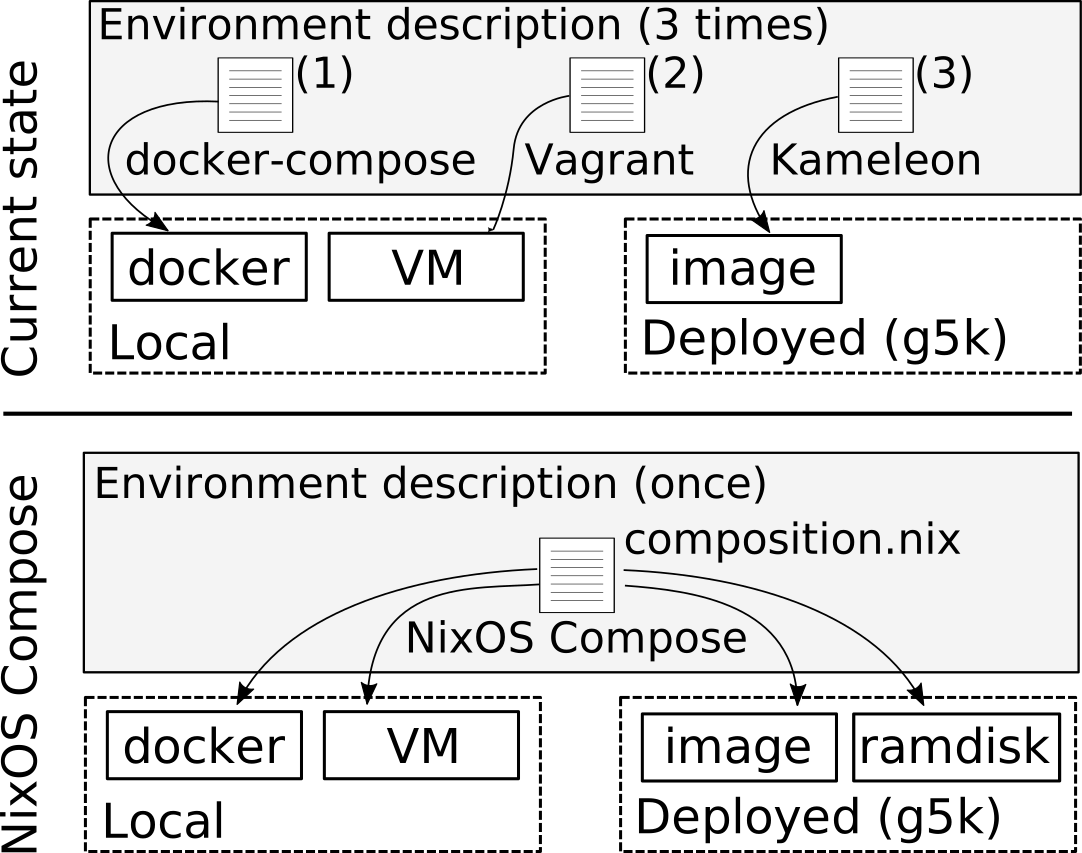
The command line tool provides a similar interaction between the different targeted platforms that we call flavours.
NixOS
As seen in the name of the project, NixOS plays an important role here. We exploit the declarative approach for system configuration provided by the NixOS Linux distribution. We also rely on the reproducibility provided by the Nix package manager which helps in the sharing and rerun of experiments.
Current support
Right now NixOSCompose is still in early stage of development, it supports the following list of flavours.
- local flavours
- docker
- vm (qemu VMs)
- vm-ramdisk (qemu VMs, limited support)
- nspawn (experimental, destructive, limited support)
- distributed flavours
- g5k-image
- g5k-image-script
- g5k-ramdisk
- g5k-nfs-store
Detailed overview
NixOS Compose works in two main phases: Build and Deploy
Tip
You can see how Build and Deploy fit in the whole NixOSCompose composition lifeline.

Build Phase
The build phase triggered by nxc build takes the Composition and the Flavour
and create a NixOS configuration.
To do so, It uses Nix and the provided composition to create one configuration
per Role. All the configurations are put in the Nix store and referenced using a
JSON file. A symlink to this file is kept in the build directory with the name
formatted as [composition]::[flavour].
Deploy Phase
Once the build is done, you can run nxc start. This phase does not use Nix
directly, but it uses the provided build file, and an optional
role-distribution to contextualize the deployment. With these elements it
creates a JSON file within the deploy directory containing all the details
about the deployment.
Then, the deployment is finally applied with the driver that will deploy the environment, using the appropriate methods depending on the flavour.